

FullVolume/FullVolumeCharter

Out now with FullVolume 0.9.4 · v0.9.4

Chart the vocals
for any song,
start to finish.

Audio in, .fvchart out. FullVolumeCharter walks a song through seven steps and hands back one file the game plays: the words, the timing, the pitches, the art and the audio, all of it in there.

Windows 10 and 11 · free · no account

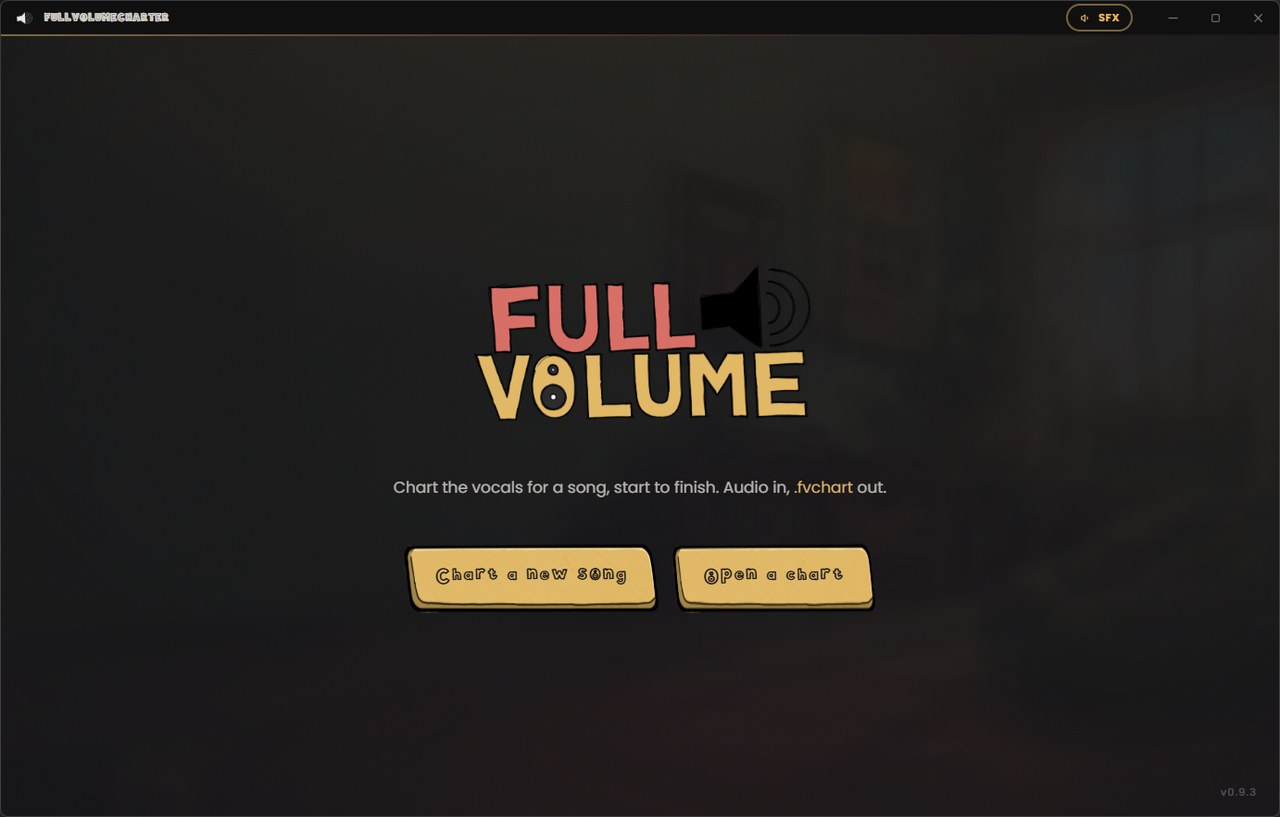
The FullVolumeCharter start screen: the FullVolume logo over the game's own room, the line 'Chart the vocals for a song, start to finish. Audio in, .fvchart out.', and two gold plates reading Chart a new song and Open a chart.
  • 7 steps from a bare audio file to a chart somebody can sing
  • 1 file out. The audio, the album art, the backdrop and the notes, all in it
  • 444 notes in the chart on this page, tapped by hand in a single pass
  • $0 and nothing to sign up for. Same as the game

What it is

Songs nobody
has charted
yet.

FullVolume plays the vocal part that is already inside a Clone Hero or Rock Band chart. That covers tens of thousands of songs, and it does not cover the one you wanted at half past eleven on a Friday. This is how that one gets a part to sing.

Point it at the audio, read the words through, tap along, set the notes. Everything you enter is saved the moment you enter it, so a song started tonight is picked up tomorrow exactly where you stopped. There is no project file to keep track of and nothing to reconvert: the last step writes the whole thing as one .fvchart, and opening that file again puts you straight back on the step you left.

It is the game's tool, so it wears the game's face. Same drawn plates, same palette, same button sounds, same hollow display face on the headings. Nothing to learn twice.

The seven steps

It asks one thing
at a time.

Each step does its own job and hands on to the next. Go back whenever you like.

1

Load the audio

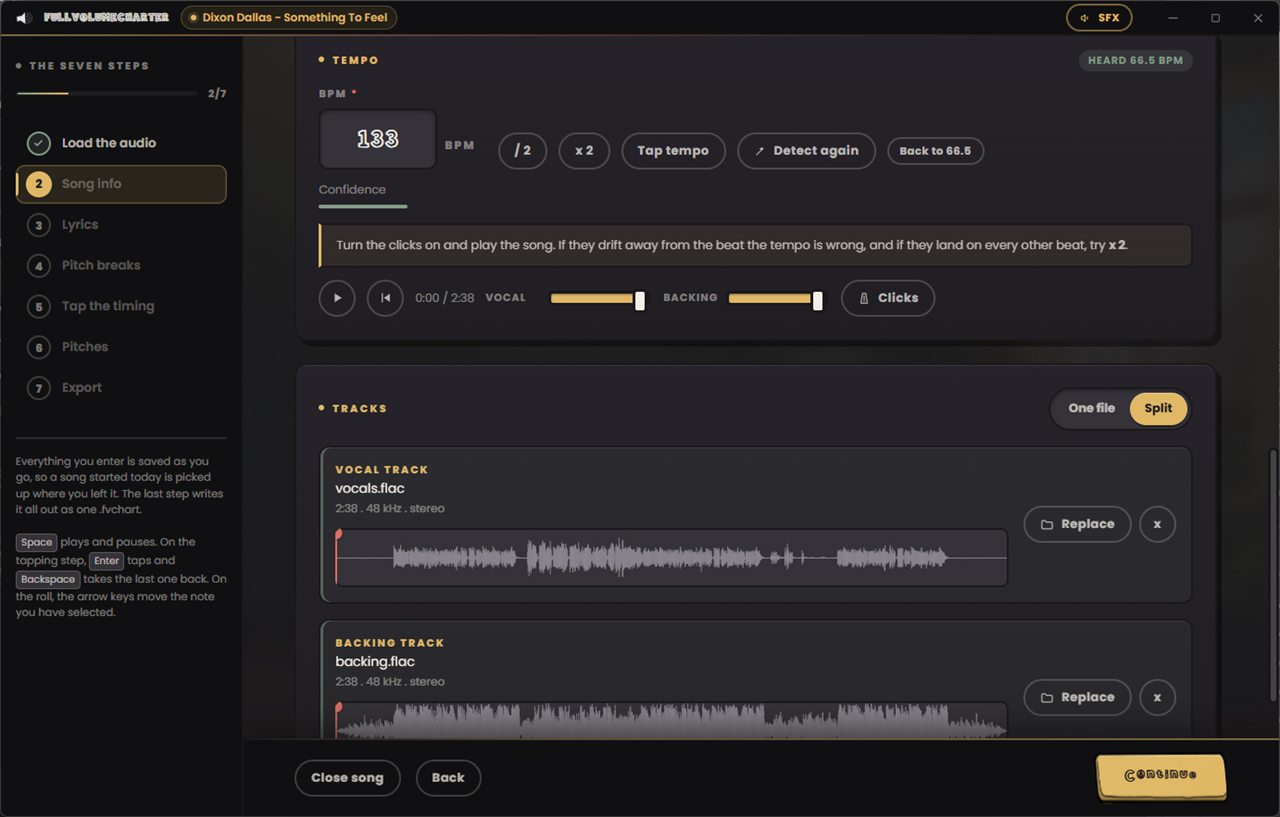
Start with the song. One file is fine. If you have the vocal and the backing as separate stems, use both and everything after this gets easier: you can hear the singer on their own while you work, and the game can lift the vocal out from under the person holding the microphone.

Drop two files in at once and it sorts them into the right slots on its own. If there is cover art, a backdrop or a timed .lrc lyric file sitting beside the track, those come in with it.
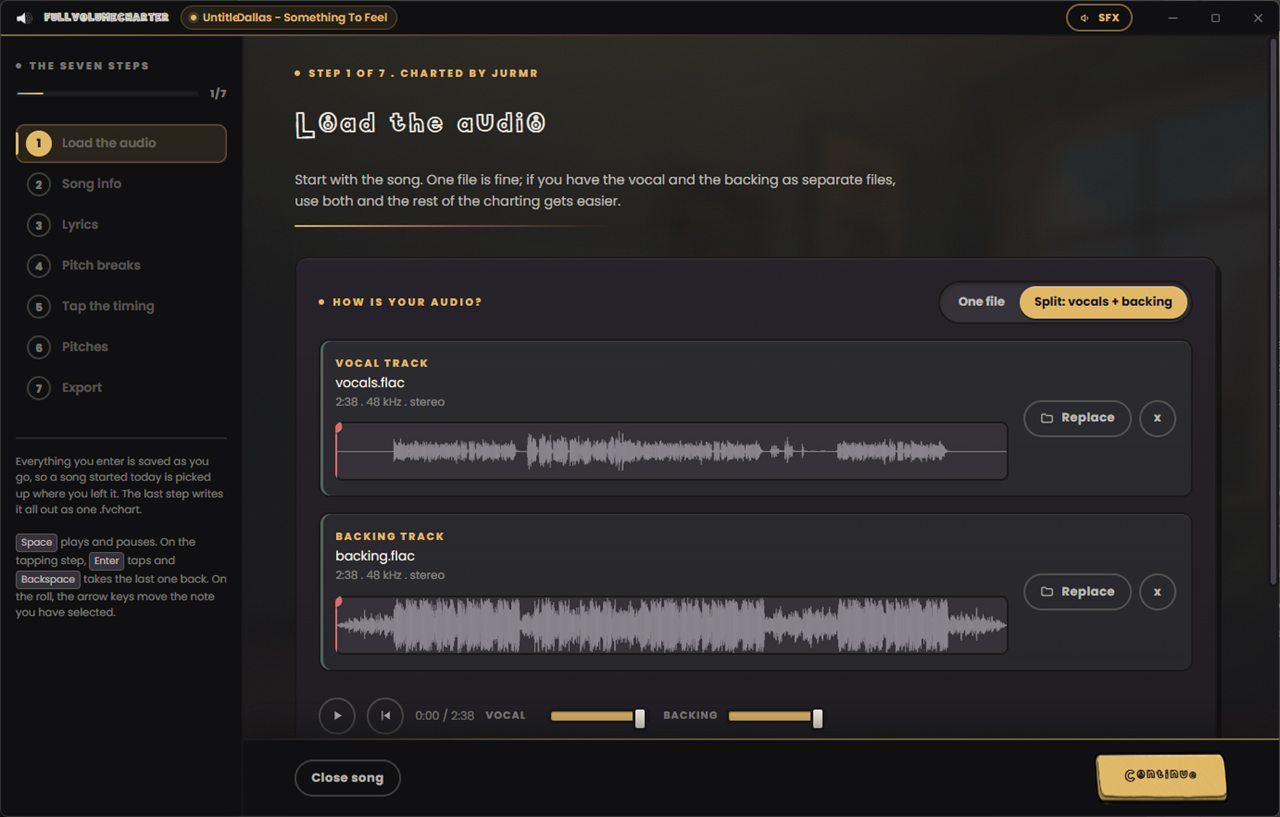
Step one of FullVolumeCharter: a vocal track and a backing track loaded as separate files, each with its waveform, length and sample rate, above a transport with independent vocal and backing volume sliders.
One file, or a vocal and a backing
2

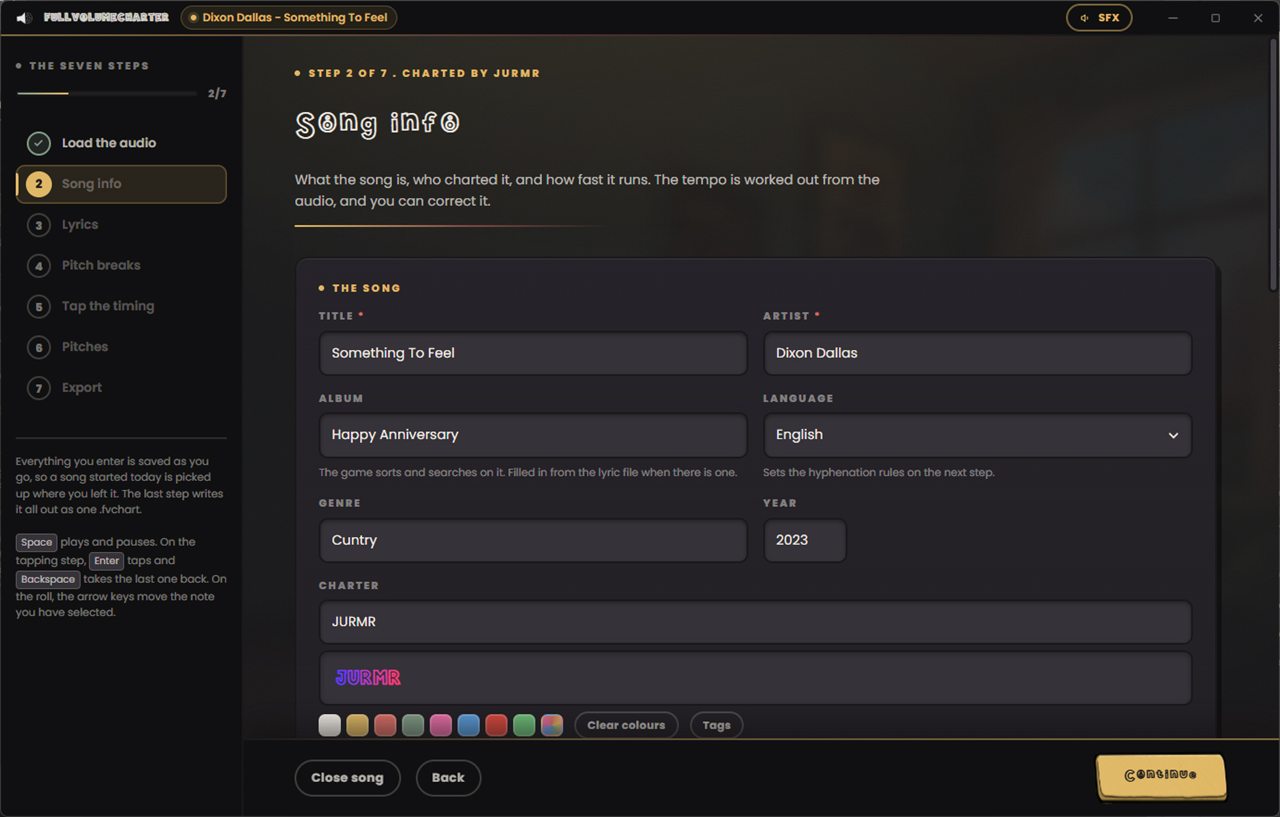
Song info

What the song is, who charted it, and how fast it runs. Title, artist, album, genre, year and the language, which is what decides how the words get split on the next step. Your charter name goes on it in whatever colors you fancy, the same rich text the game uses for player names.

The tempo is worked out from the audio. It shows you how confident it is, and when it is wrong you halve it, double it or tap it in yourself. Turn the clicks on and play the song: if they drift off the beat the number is wrong, and if they land on every other beat, press x2.

Step two of FullVolumeCharter: the song information form, with title, artist, album, language, genre, year and a charter name field showing the name JURMR colored letter by letter above a row of palette swatches.
Your name on it, in your own colors
3

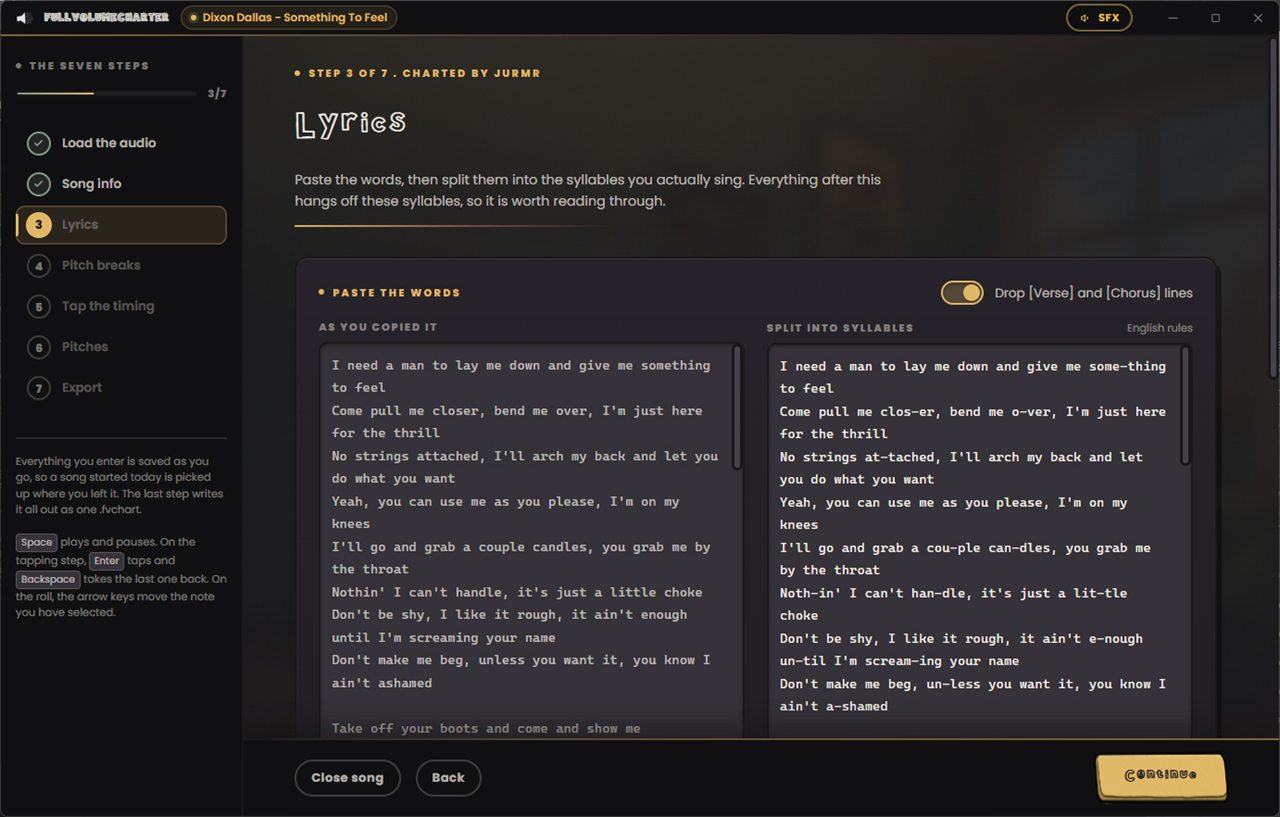
Lyrics

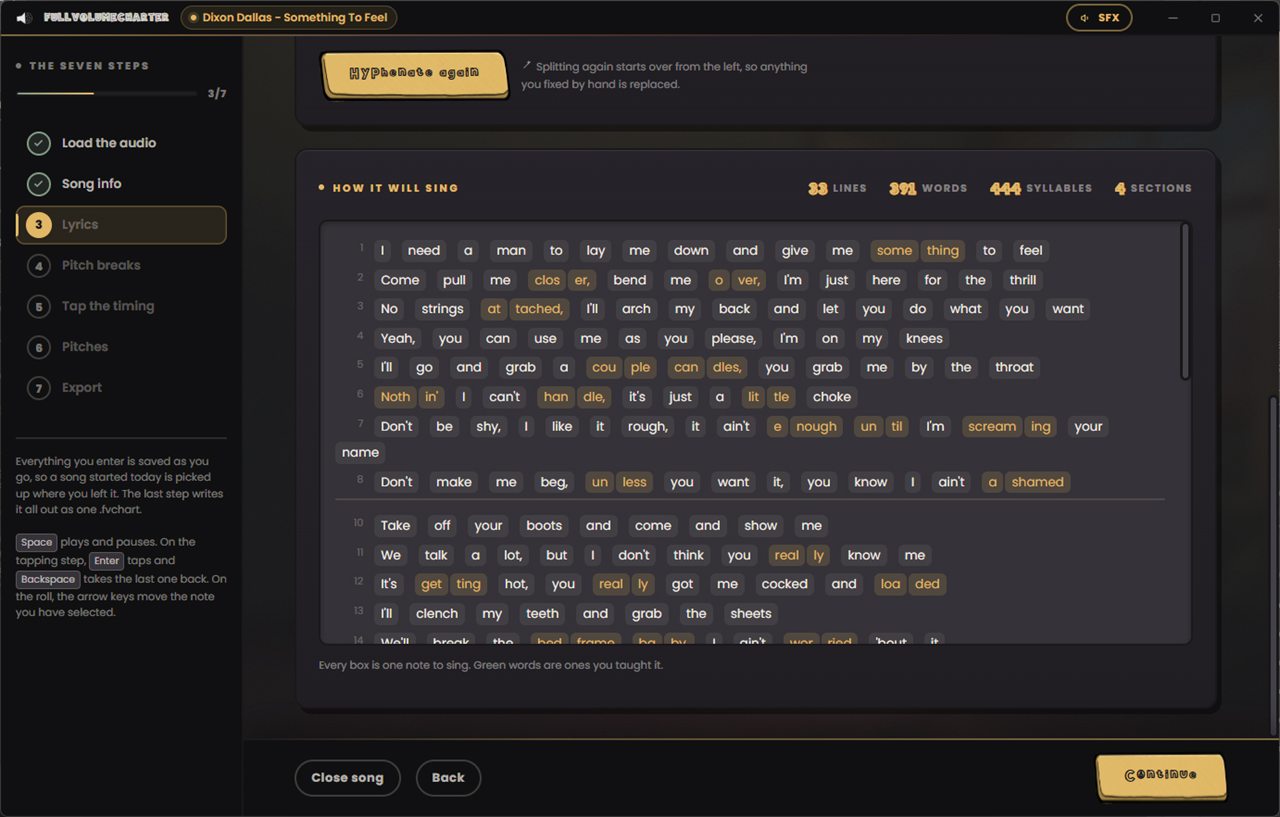
Paste the words in. They get split into the syllables that are actually sung rather than the ones a dictionary would print, using the rules of the language you picked, and anything it gets wrong you fix by hand. It remembers your corrections and stops getting that word wrong.

The panel underneath shows how the song will sing: one box per note, line by line, with a running count of lines, words, syllables and sections. Green means you taught it that one.

Step three of FullVolumeCharter: pasted lyrics on the left and the same lines split into hyphenated syllables on the right, with a toggle to drop bracketed Verse and Chorus markers.
Pasted words on the left, sung syllables on the right
4

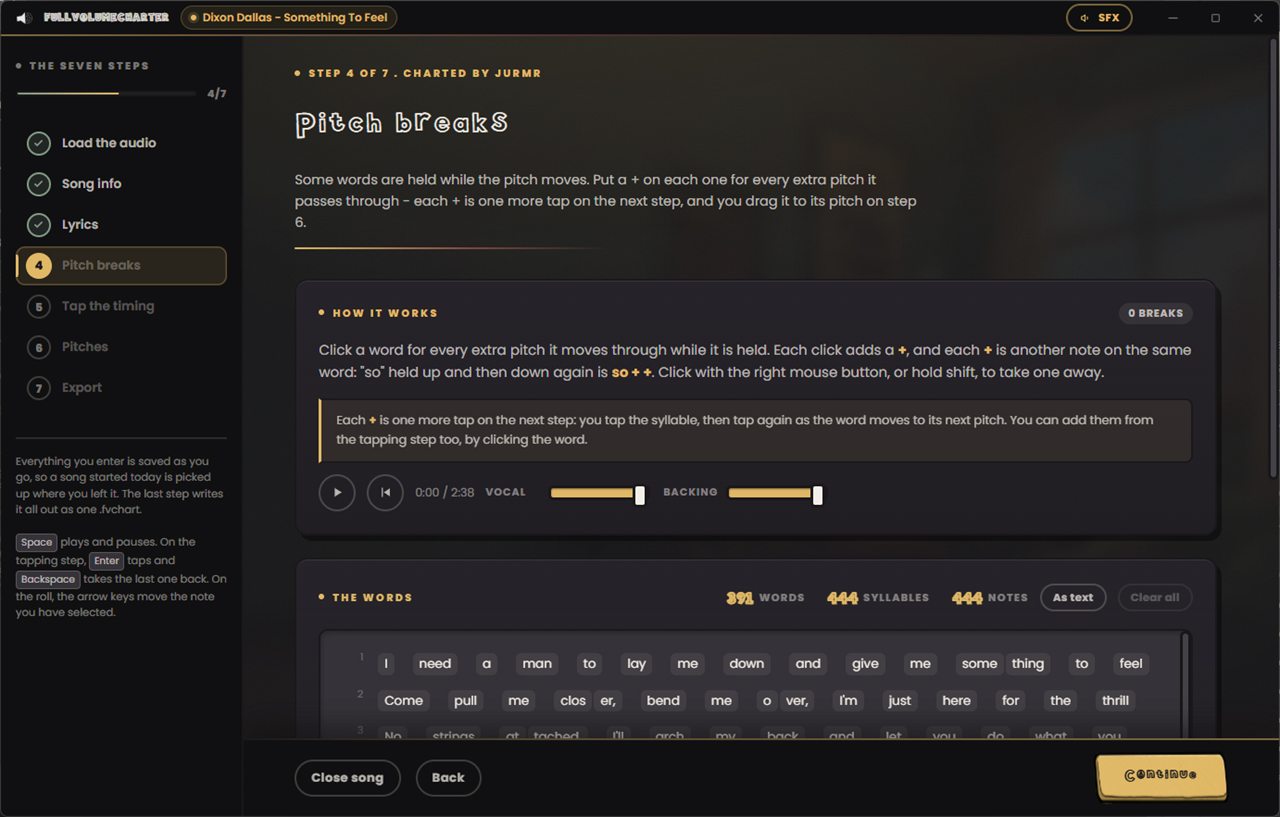
Pitch breaks

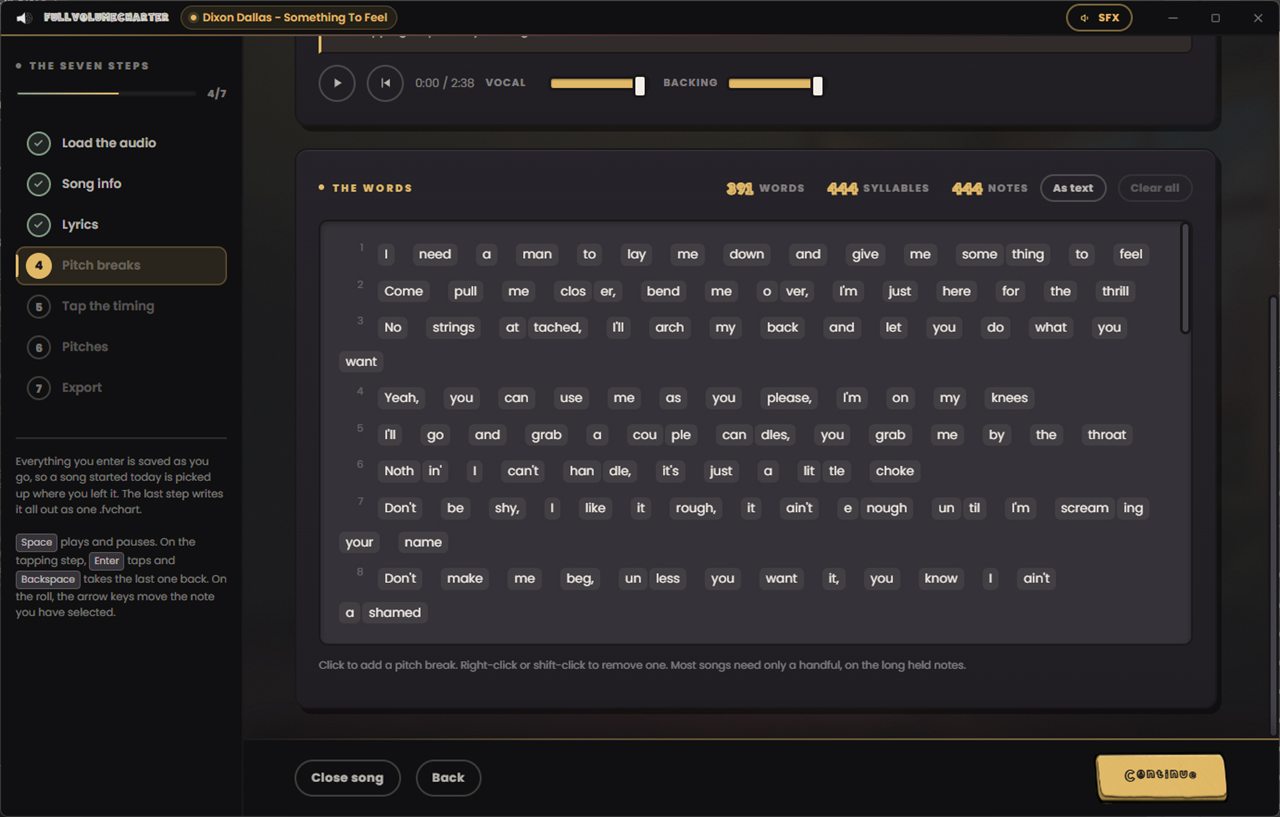
Some words get held while the pitch moves underneath them. Click a word once for every extra pitch it passes through and it picks up a +. A "so" held up and then back down again is so + +.

Each + is simply one more note on the same word: one more tap on the next step, and one more thing to drag on the step after that. Most songs need a handful, on the long held notes.

Step four of FullVolumeCharter: every syllable of the song laid out as clickable boxes line by line, with counts of words, syllables and notes above them.
Click a word for every pitch it moves through
5

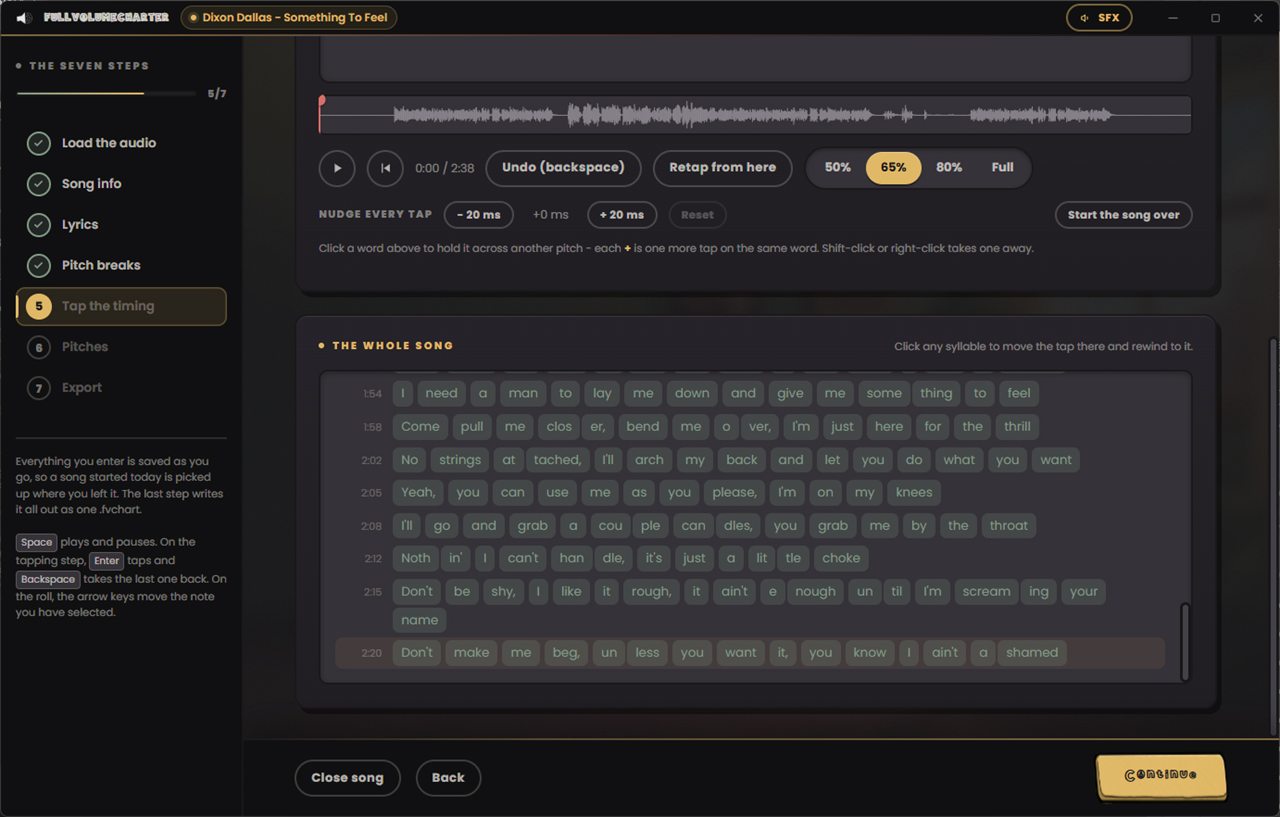
Tap the timing

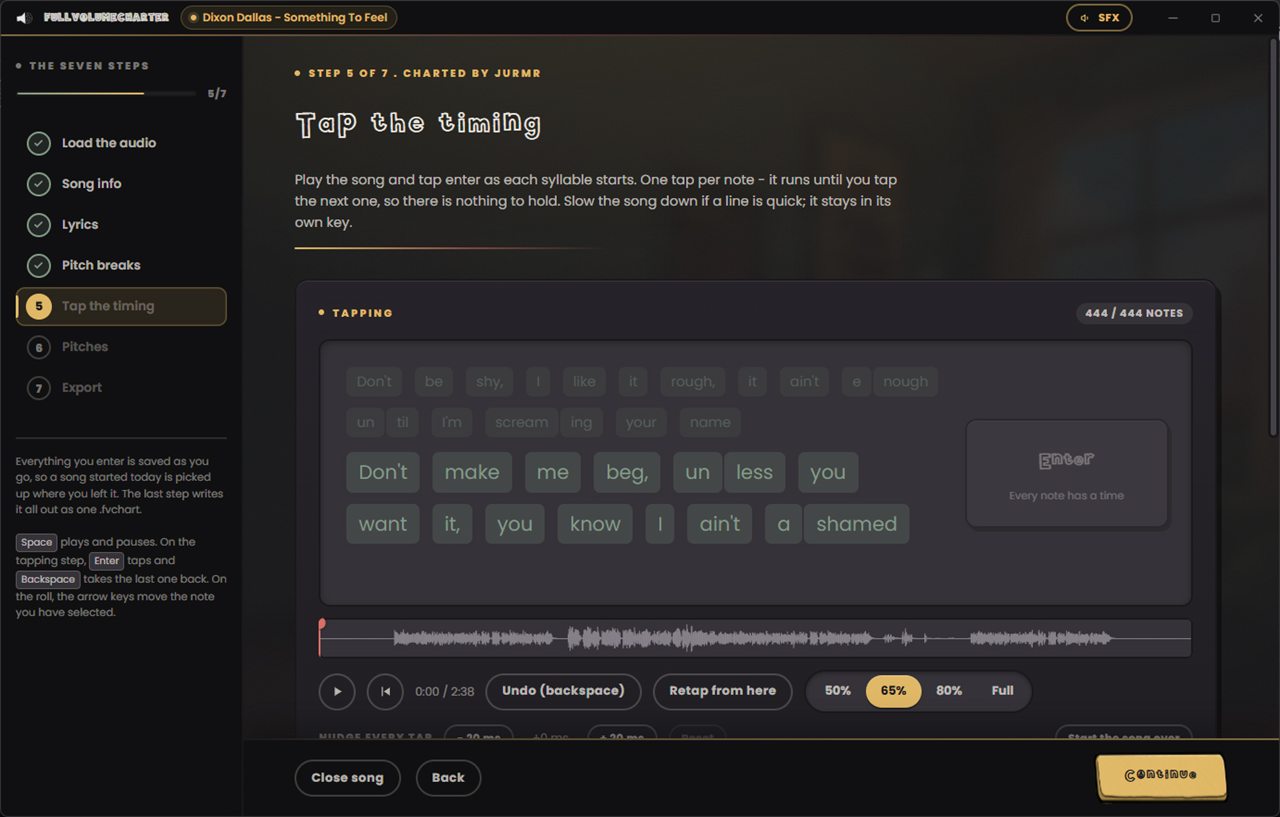
Play the song and tap Enter as each syllable starts. One tap per note, and nothing to hold: a note simply runs until the next one is tapped.

Fast lines get slowed to 50, 65 or 80 per cent, and the song stays in its own key while they do, so you can still hear where you are instead of a record dragging to a halt. Backspace takes the last tap back. Click any syllable in the list to move the tap there and rewind to it, or nudge every tap in the song 20 milliseconds either way if your ears were running ahead all along.

Step five of FullVolumeCharter: the tapping view, with the upcoming syllables in a grid, an Enter prompt, the song waveform, an undo button and speed buttons at 50, 65, 80 per cent and full.
One tap per note, at whatever speed you can manage
6

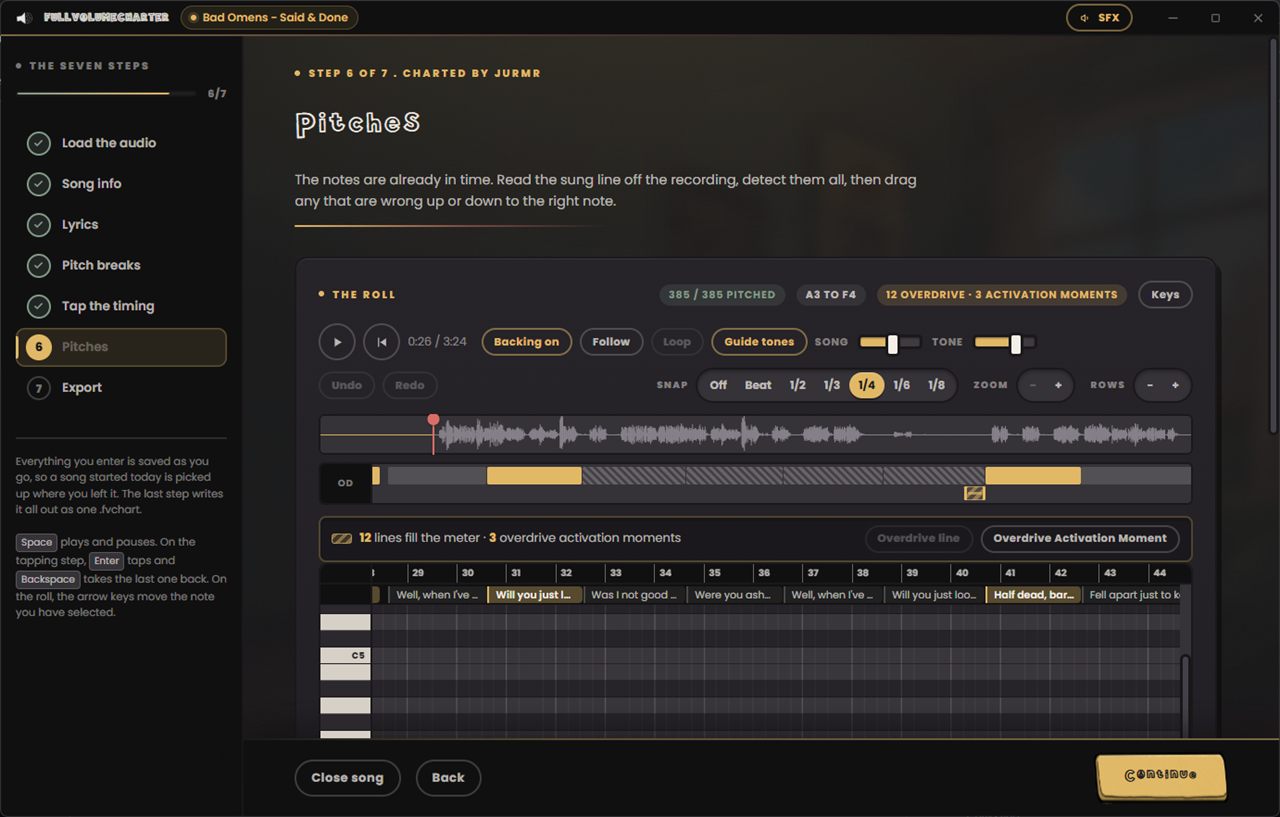
Pitches

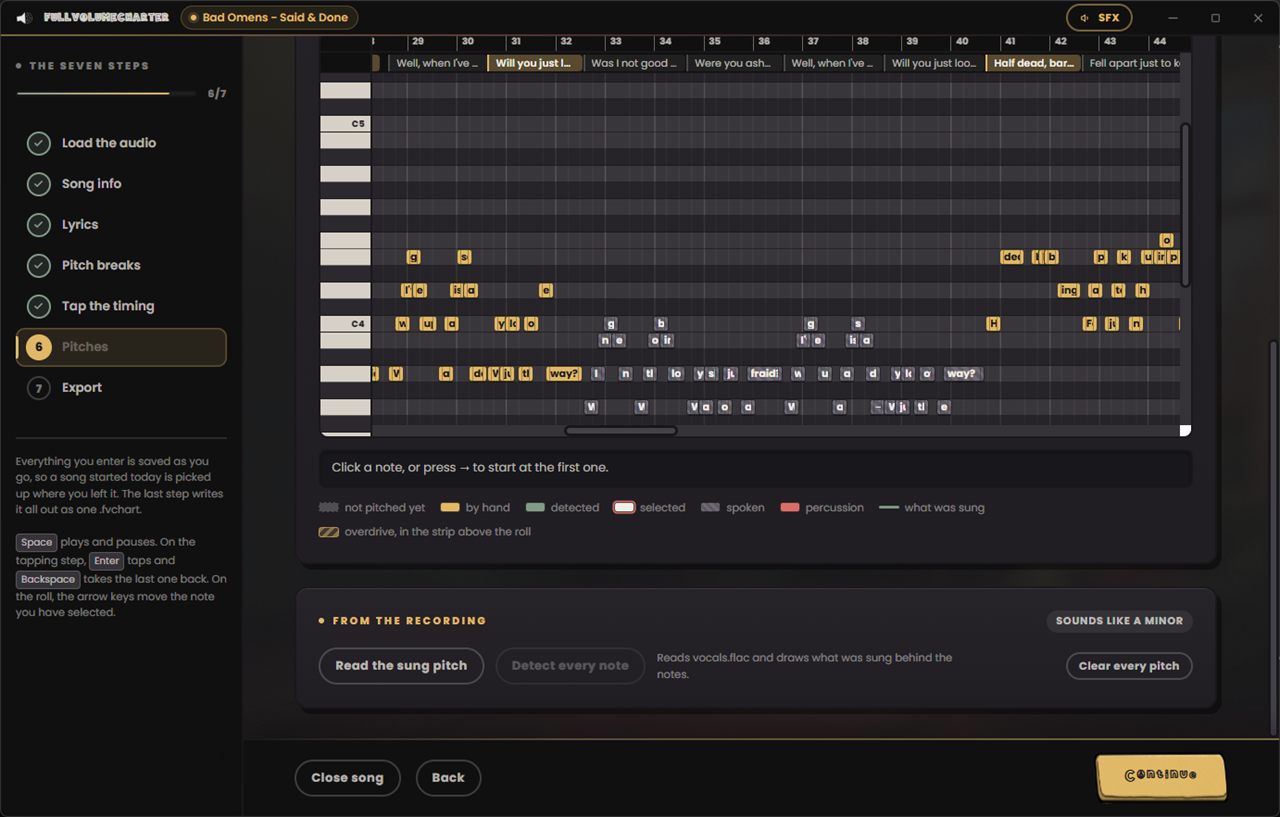
Everything is already in time, so all that is left is how high each note goes. It reads the sung line straight off the recording and lays the notes on it, a phrase at a time rather than a note at a time, so nothing lands an octave away from what it is sung next to.

Then you drag whatever it got wrong. A guide tone plays the note under the cursor so you can hear what you are setting, with its own volume against the song. Anything too quiet or too ragged to be sure of is listed for you to check by ear rather than quietly guessed at.

A strip above the roll is where overdrive is charted: mark the phrases that fill the singer's meter, then pick the moments in the rests where they are allowed to let it out. It sits above the roll rather than inside it because overdrive is charted at the scale of a song, and a mark made in a roll zoomed to a bar or two is blind to the run it belongs to.

Step six of FullVolumeCharter: the piano roll, with a note box per syllable laid out against a keyboard down the left, a color key beneath it, and the read from the recording panel.
The sung line, read off the recording
7

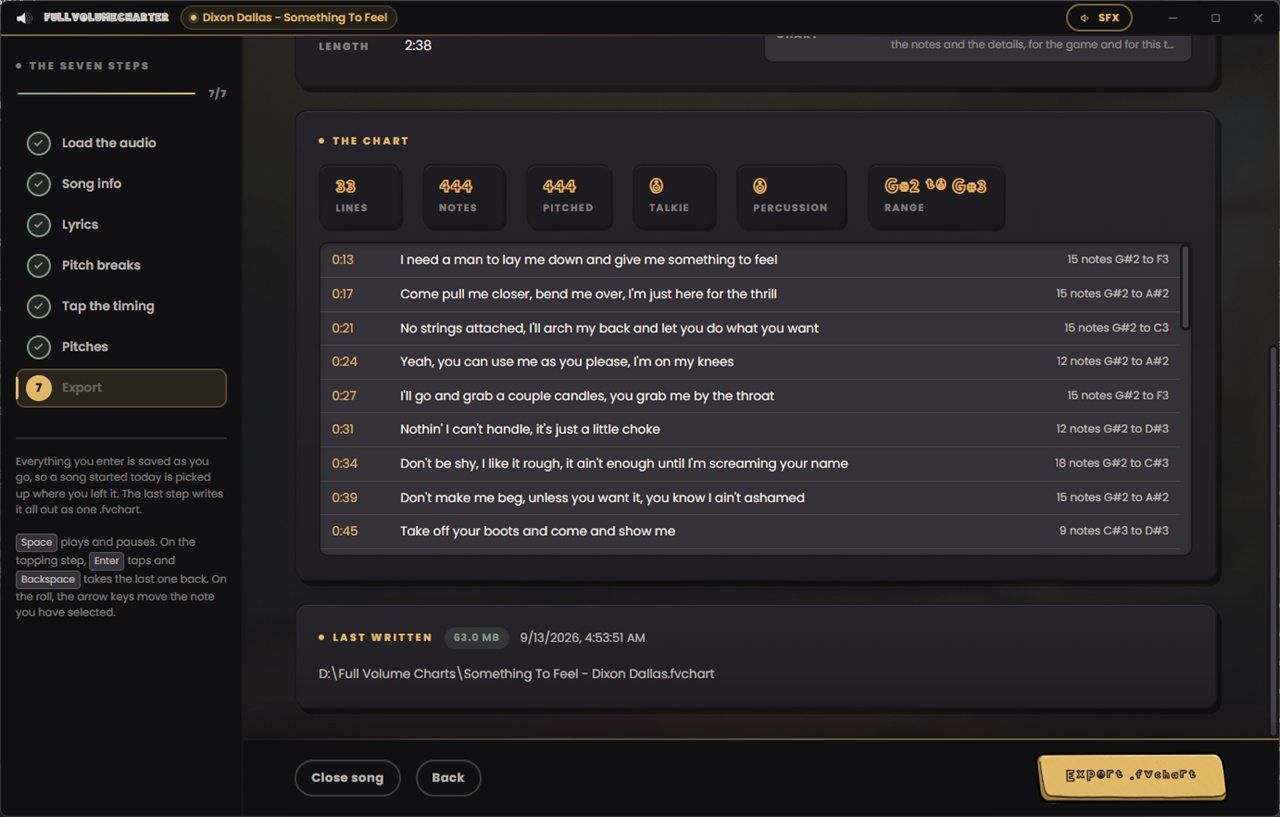
Export

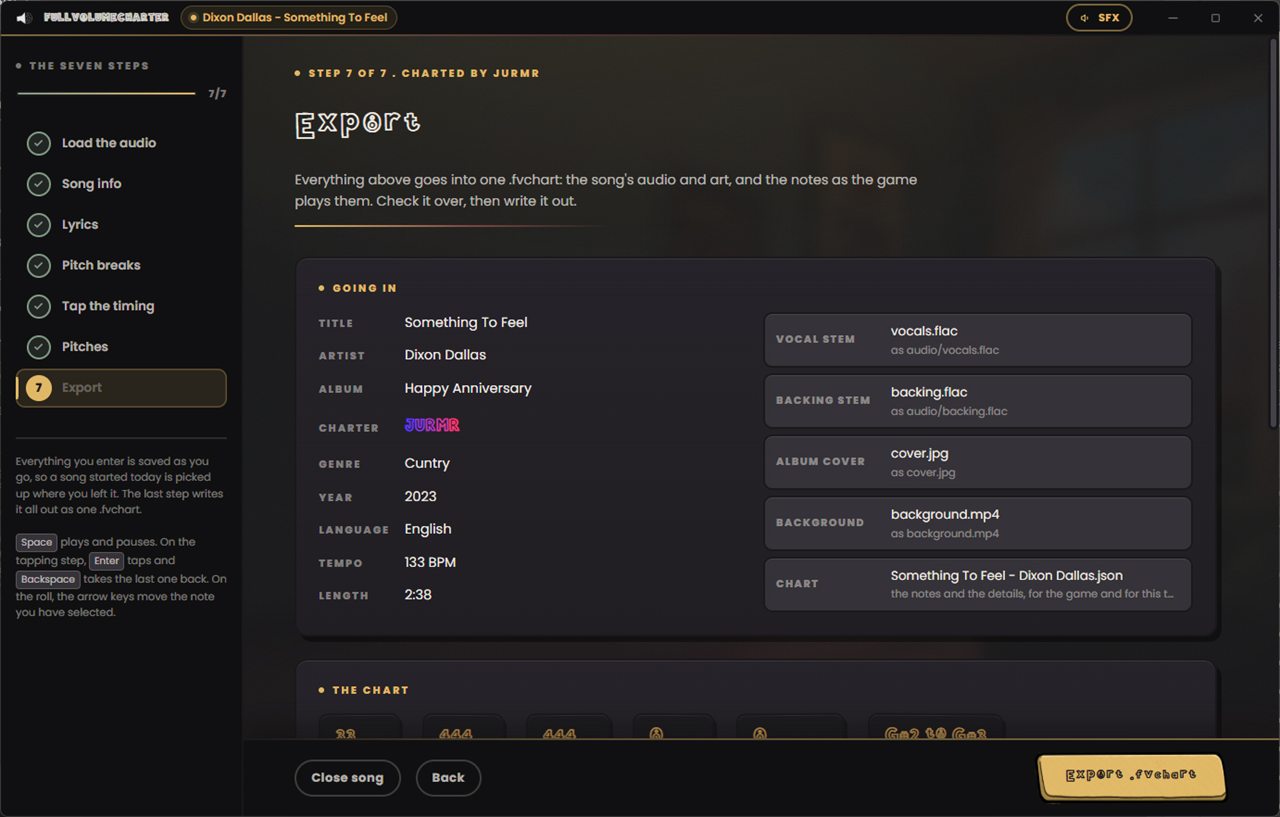
Everything above goes into one .fvchart: the stems, the cover, the backdrop and the notes as the game plays them. The last screen lays out what is going in and what the chart came to, line by line with the note count and the range on each.

Write it out, drop it in a folder the game is watching, and it is on the song list. Open the same file again later and the tool picks it apart and puts you back on whichever step you want.

Step seven of FullVolumeCharter: the export summary, listing title, artist, album, charter, genre, year, language, tempo and length beside the vocal stem, backing stem, album cover, background video and chart file about to be packed.
One file, with everything in it

The parts that do the work

It does the boring
half for you.

None of it guesses on your behalf. All of it saves you an evening.

It hears the tune

The sung pitch comes off the recording a phrase at a time, weighing each note against the ones either side of it, the singer's register and the key of the song. A note it cannot hear is left empty rather than filled in with a guess.

It splits the words

Sung syllables, not typeset ones. "About" breaks after the a, "every" keeps its three, and the slang a lyric sheet is full of is handled on purpose. Correct it once and it has learned that word.

It keeps the key

Slowing a song down usually drags it an octave into the floor. This one stretches the time and leaves the pitch where it was, so half speed is still a song you can follow while you tap it.

It reads what is lying about

A timed .lrc beside the track brings its own words and line times in, so a song somebody has already synced does not get retyped. Cover art beside the file lands in the right slot too.

One file, not a folder

A .fvchart carries the audio, the art, the backdrop and the notes together. Nothing to zip, nothing to keep next to anything else, and it travels between players in one piece.

It never loses your evening

Every field, every tap and every note is saved as you enter it. Close it mid-song and the start screen offers it straight back, on the step you were on.

A closer look

Every screen.

Straight out of the tool. Nothing here is a mock-up.

Questions

Before you
chart anything.

How long does a song take?

An evening for your first, well under an hour once you have the hang of it. The tapping is the part that takes real time, and it is the part you can slow down. Everything else is reading through what the tool has already worked out and correcting the bits it got wrong.

Do I need the vocal on its own?

No, one mixed file charts perfectly well. Separate stems make it easier, because you can hear the singer without the band on top while you tap and while the tool reads the pitch, and because the game can then lift the original vocal out from under whoever is holding the microphone. Free stem splitters are easy to come by if you want them.

Do I have to be able to read music?

No. You never type a note name. The tool reads the pitch off the recording and draws it, you drag anything that looks wrong, and the guide tone plays what you are dragging so you can check it by ear. If you can tell when something sounds off, that is the whole skill.

What if a song is mostly shouted?

Then it is mostly talkies, and that is a real answer rather than a workaround. A note with no tune under it is scored on landing in time rather than on pitch, so rap and shouted choruses chart fine and play fine.

Can I edit a chart after I have written it?

Yes. Open the .fvchart and the tool unpacks it, puts every step back the way you left it and lets you change anything. Exporting again writes over the same file.

Can I share the charts I make?

They are your files, so that is your call. Bear in mind that a .fvchart has the song's audio inside it, so passing one around means passing the recording around, with everything that implies. The game can hand a chart straight to somebody in your room who has not got it, which is what most people actually want.

Does it need FullVolume installed?

No. It is its own program and charts on its own. You will want the game to hear the result, obviously, but you can install them in either order and neither one needs the other to run.

Can it read or write Clone Hero and Rock Band charts?

Not at the moment. It writes .fvchart, which is the format built for this game. The game reads Clone Hero folders, .sng archives and Rock Band _rb3con packages already, so the charter exists for the songs those do not cover.

Download

Chart the one
nobody has.

One installer, per user, no admin rights, same as the game. Out now, alongside FullVolume 0.9.4.

GET IT
What changed in this one? Read the release notes

What you need

To chart a song

The audio
Any FLAC, WAV, MP3 or M4A of the song
The words
A lyric sheet you can paste. A timed .lrc if you have one
Your ears
Headphones, ideally. You are listening for note edges
Time
An evening for your first one

Nice to have

Stems
The vocal and the backing as separate files
Album art
Anything square. It goes in the chart
A backdrop
A picture or a video to sing against
Patience
The tapping step rewards a second pass

You bring the song. The tool brings everything else.